
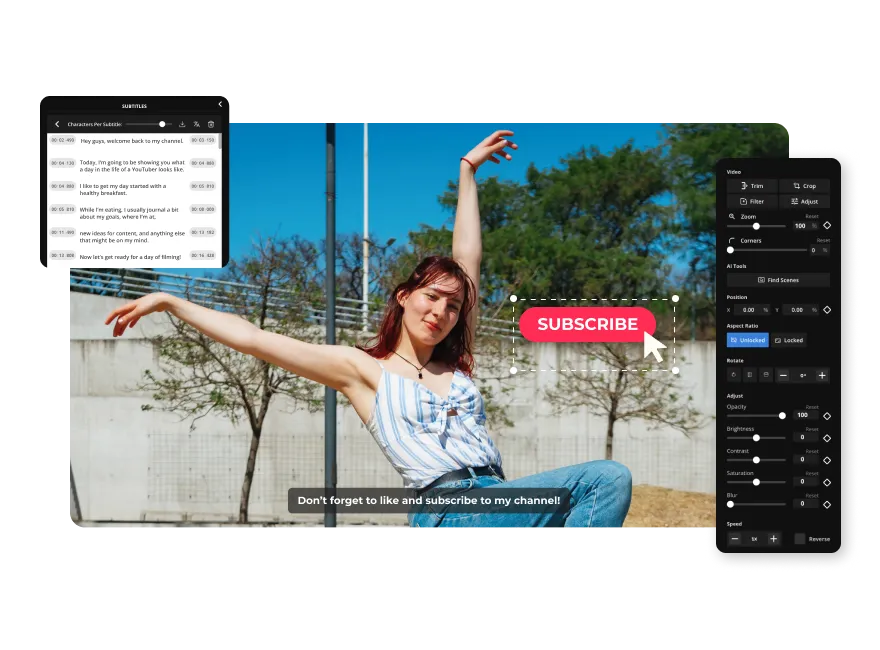
Creating and editing videos for YouTube used to require heavy editing software, steep learning curves, and long hours. But with advances in AI, you no longer need to be a production expert to make great videos. In this list, we highlight five top tools — starting with the strongest — that simplify video creation using AI.
1. Invideo — The All‑in‑One, Easy “AI YouTube Video Editor”
If you want to generate full YouTube videos — with visuals, voiceovers, subtitles, and polished editing — without touching a timeline or hiring an editor, Invideo’s AI youtube video editor stands out.
Why Invideo leads
- Text-to‑video magic: Just describe your idea or pick from a workflow. Invideo converts the description into a scene‑by‑scene storyboard and generates the video for you.
- AI Avatars & Actors: You can clone yourself or pick a professional actor from the marketplace; ideal if you prefer a “faceless” or avatar-led channel.
- Voiceovers, subtitles, translations: Invideo offers realistic AI voiceovers (with varied accents and languages), automatic subtitles, and even translation — handy if you aim for a global audience.
- Flexible editing: No complex timelines needed. Edit with simple text commands (change scene, tweak voice, adjust music), or fine‑tune manually for precision.
Best for: Creators, marketers, agencies or small businesses who want a quick, professional workflow — from idea to publishable YouTube video — without technical hassles.
If you’ve got blog content, product/service stories, or campaign ideas — Invideo works beautifully. It’s especially useful for “faceless” channels, ads, explainers, tutorials, and social‑media‑style videos.
2. VEED.io — Simple Online Editor with AI Subtitles & Collaboration
VEED.io is a browser-based video editing platform that offers AI‑powered tools such as auto‑subtitling, AI avatars, and translation — making it a solid alternative for YouTube creators.
What VEED.io brings to the table
- Easy editing and auto‑subtitles: Great for creators who want to add captions to their videos quickly — helpful for accessibility and reach.
- Team collaboration: Good for small teams or agencies working together on videos, which makes it handy if you work with editors, writers, or marketers.
- Flexible output formats: You can create standard YouTube videos, short‑form videos, social media content, making it versatile for cross‑platform sharing.
Best for: Creators who already have video clips or voiceovers and want a simple but effective editing and subtitling tool — or those working in small teams and want collaborative editing.
3. Canva (AI Video Generator) — Quick, Template‑Driven Videos for Beginners
Known mostly for graphics and design. Canva now includes an AI video generator that lets users convert text or ideas into video clips easily.
Why Canva makes sense for YouTube beginners
- User-friendly interface: If you’re already familiar with Canva’s design tools, creating simple videos is intuitive. No learning curve.
- Templates + Assets: Use pre-made templates, stock visuals, and graphics to build explainer videos, intros, or short content — useful for quick uploads or social‑media‑oriented channels.
- Good for short formats or teasers: While Canva may not replace a full-fledged editor for long-form content, it’s great for quick content, promos, or simple videos complementing longer uploads.
Best for: Beginners, small businesses, marketers, or creators who want simple, clean videos without complexity — especially for product promos, short reels, or quick social content.
4. Syllaby.io — Faceless Video Maker Optimised for Social Reach
If you’re thinking of creating scalable, faceless content for YouTube or social media — without recording or hiring actors — Syllaby.io is one indirect alternative to Invideo.
What stands out with Syllaby
- Minimal effort, maximal output: Designed for creators and businesses aiming to publish frequently. Easy to build videos that can resonate — especially for niche, value‑driven, or information-based channels.
- Good for virality & engagement: Some users report strong reach and conversion rates even without showing faces or using heavy production, making it useful for marketers, bloggers, educators, or small brands.
Best for: Content creators focused on fast output, faceless content, social‑friendly clips, or educational/informative videos on YouTube and other platforms — without needing heavy editing or filming skills.
5. quso.ai (formerly Vidyo.ai) — Quick Editing & Repurposing Tool
If you prefer to repurpose existing content — for example long video shoots or raw footage. Quso.ai is a helpful tool that some creators use alongside AI video makers.
How quso.ai adds value
- Automated cutting & editing: Useful when you have raw footage from interviews, webinars, or shoots. quso.ai helps trim, rearrange, and produce polished edits quickly.
- Speed and simplicity: It saves time especially when you want multiple output formats (shorts, highlights, full episodes) from a longer video — handy for creators juggling multiple channels or content formats.
Best for: Creators who shoot raw footage and want to quickly convert that into shareable content — or those who want to repurpose long videos into highlights, shorts, or social clips.
Final Thoughts
If you want a dependable, powerful, and flexible “AI YouTube video editor” that handles everything — from script to final edit. Invideo remains the best all‑around tool today. It’s especially useful for creators, marketers, and small teams. Who want to maximize output without investing in big equipment or learning complex editing software.
That said, depending on your needs — like quick edits, subtitles, social media clips, or repurposing existing footage. Tools like VEED.io, Canva, Syllaby, or quso.ai can complement your workflow nicely.
Whether you aim to grow a faceless channel, launch ads, make product promos, or educate viewers. There’s an AI‑powered “YouTube video editor” to match your pace and style.